Hameral Big Trade Orders Bubble Indicator
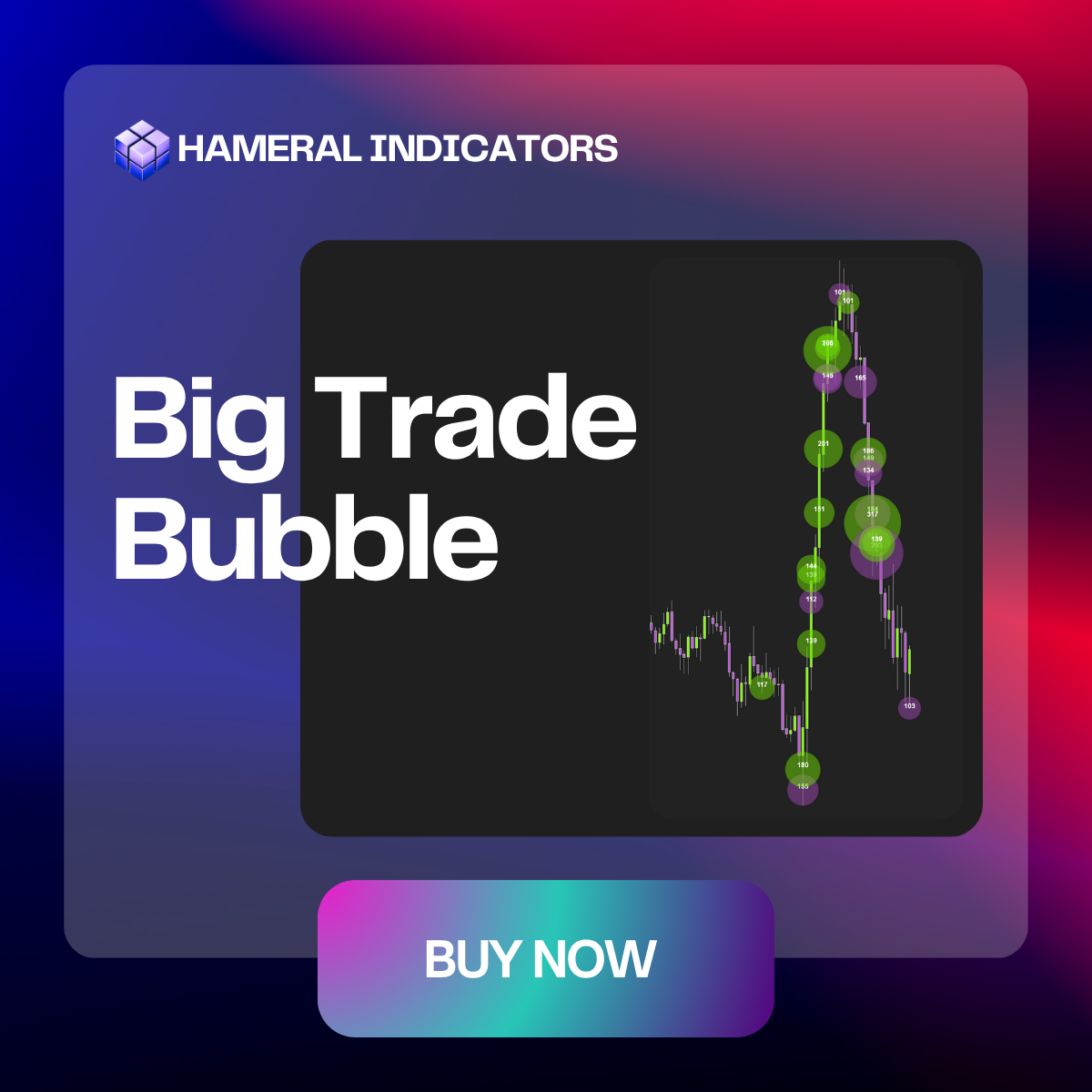
Hameral Big Trade Orders Bubble highlights large, aggressive orders directly on your candles, so you instantly see where smart money steps in and where price is likely to react.

✔️LifeTime License ✔️ Free Updates ✖️ No Order Flow+ Needed
🛡️Secured SLL Checkout
💳 All Major Cards
✖️ VAT Not Included
Description
Hameral Big Trade Orders Bubble is an order flow overlay for NinjaTrader 8 that plots dynamic bubbles wherever big orders hit the tape, making institutional activity visible at a glance.
Using four detection modes, it can track fast sweeps, concentrated buying/selling at the bid/ask, heavy volume at a single price level, or even single big prints – all transformed into clean, readable bubbles.
You can decide whether to focus only on aggressive volume at bid/ask or total volume, filter out small orders, and even require advanced DOM conditions like iceberg refills or “smart” liquidity depletion.
The result: a clear map of where big traders actually committed size, letting you anticipate potential reversals, continuation moves, and high-probability reaction zones instead of guessing from candles alone.
Features & Setups
Sweep Mode – To Detect Fast Aggressive Order Flow
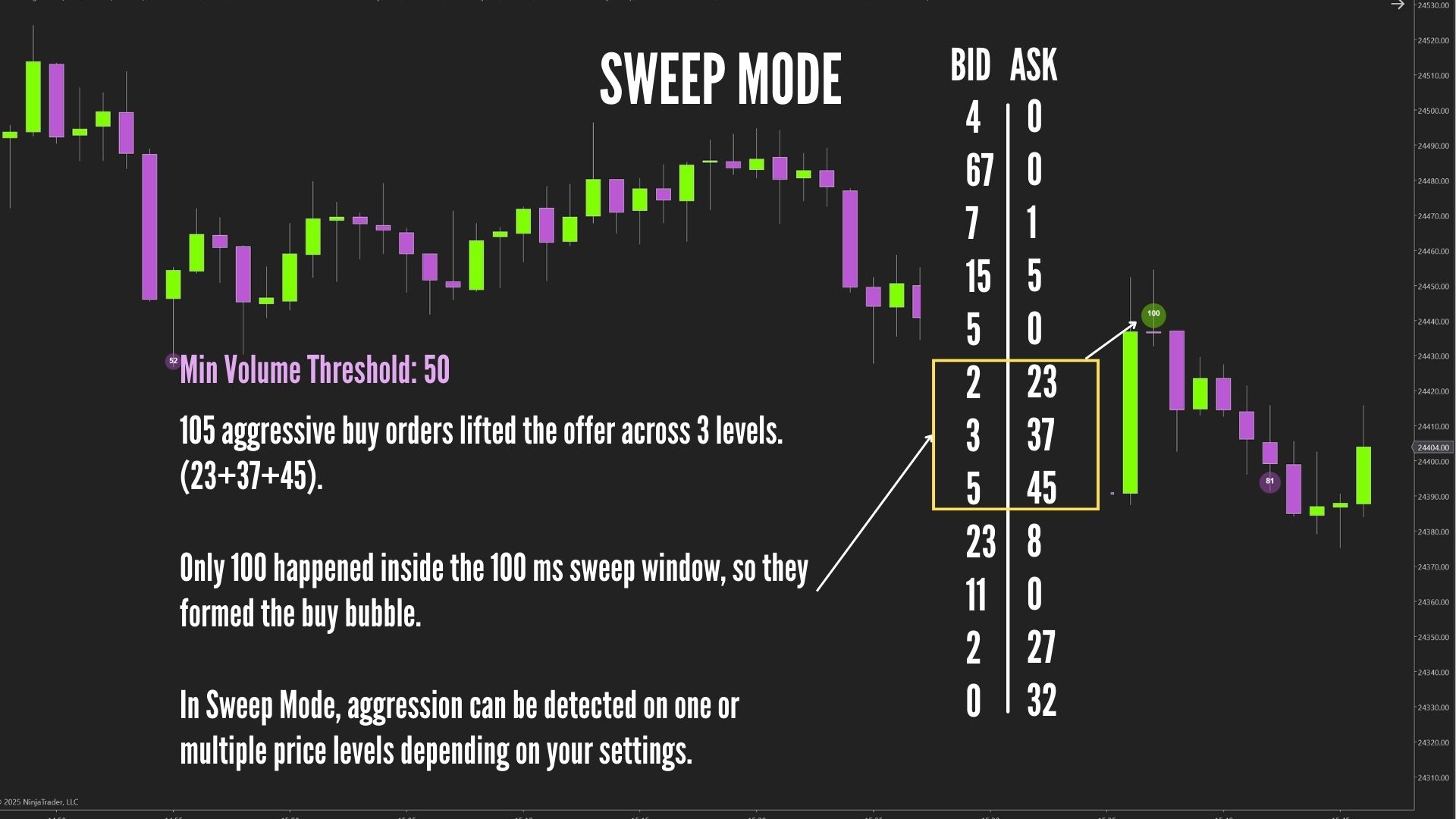
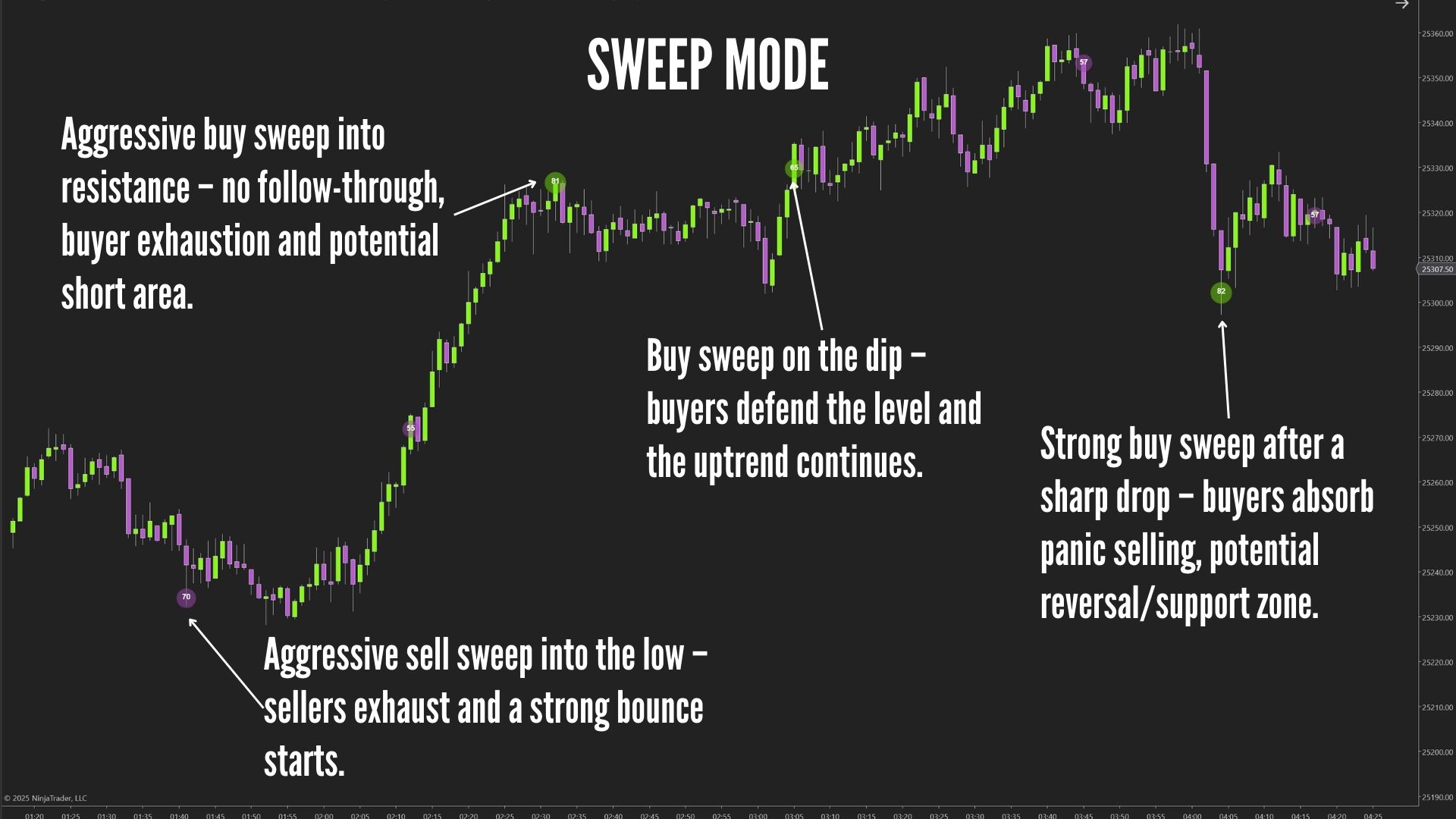
Sweep Mode groups fast, same-side trades that occur within a short time window into one large “sweep bubble,” revealing aggressive buying or selling that hits multiple price levels in a single push.
Why Use It / Benefits
- Shows true aggression: identifies when buyers or sellers are actively taking liquidity and pushing through levels.
- Reveals momentum shifts: sweeps often mark the start of a breakout or strong continuation.
- Filters noise: condenses multiple micro-trades into one clean, meaningful signal.
- Highlights smart money activity: institutions often sweep several levels when entering with size.
Short Example
Price is consolidating. Suddenly, a burst of buy orders rapidly lifts the ask across several price levels within milliseconds. Sweep Mode groups these into one large green bubble, showing powerful buyer aggression — often a precursor to an upside breakout.
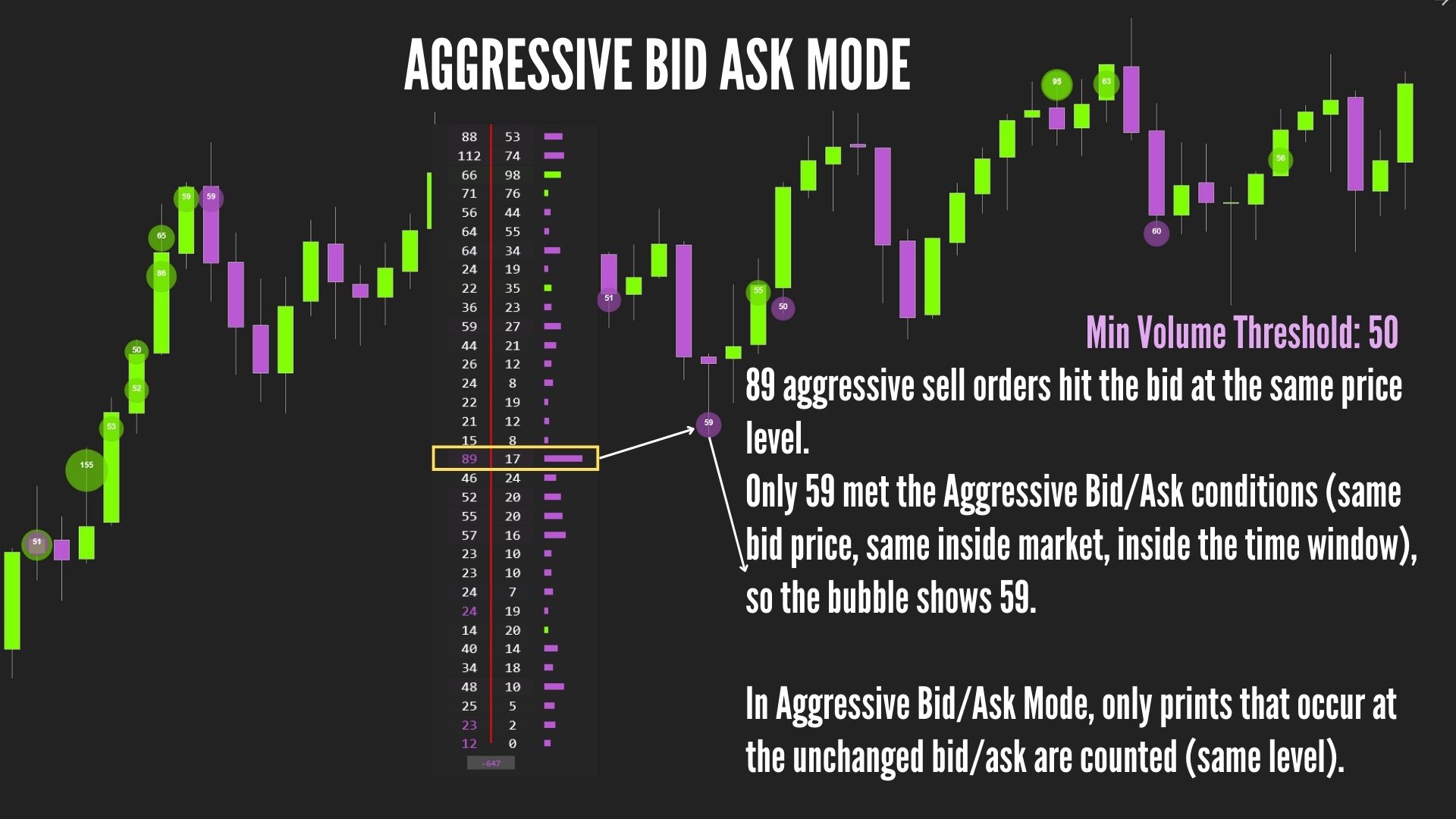
Aggressive Bid/Ask Mode – Detect Market Order Aggression at the Same Price Level
Aggressive Bid/Ask Mode detects large buying or selling activity by reading whether trades hit the ask (aggressive buyers) or the bid (aggressive sellers) while the best bid/ask prices remain unchanged. This reveals concentrated initiative volume exactly at the inside market.
- Identifies real initiative flow: shows whether traders are aggressively lifting the ask or hitting the bid at a fixed price level.
- Reveals absorption and hidden liquidity: repeated hits at the same bid/ask expose iceberg activity and large passive players.
- Predictive turning points: heavy bid hits often signal pending drops, while heavy ask lifts signal possible breakouts.
- Ultra-clean signals: no grouping by time or price movement – only true aggressor activity at a single price.
Short Example
Price pauses at support. Large sell market orders repeatedly hit the bid at the same price, but the bid does not move down because passive liquidity absorbs them.
Aggressive Bid/Ask Mode prints multiple red bubbles at that exact level, revealing strong sell aggression and absorption — a warning that support may soon break
if buyers are not showing into the market. If the sellers manage to break the big-bubble level, it can be a strong breakout.
Level Volume Mode – To Detect Heavy Volume Stacked at a Single Price
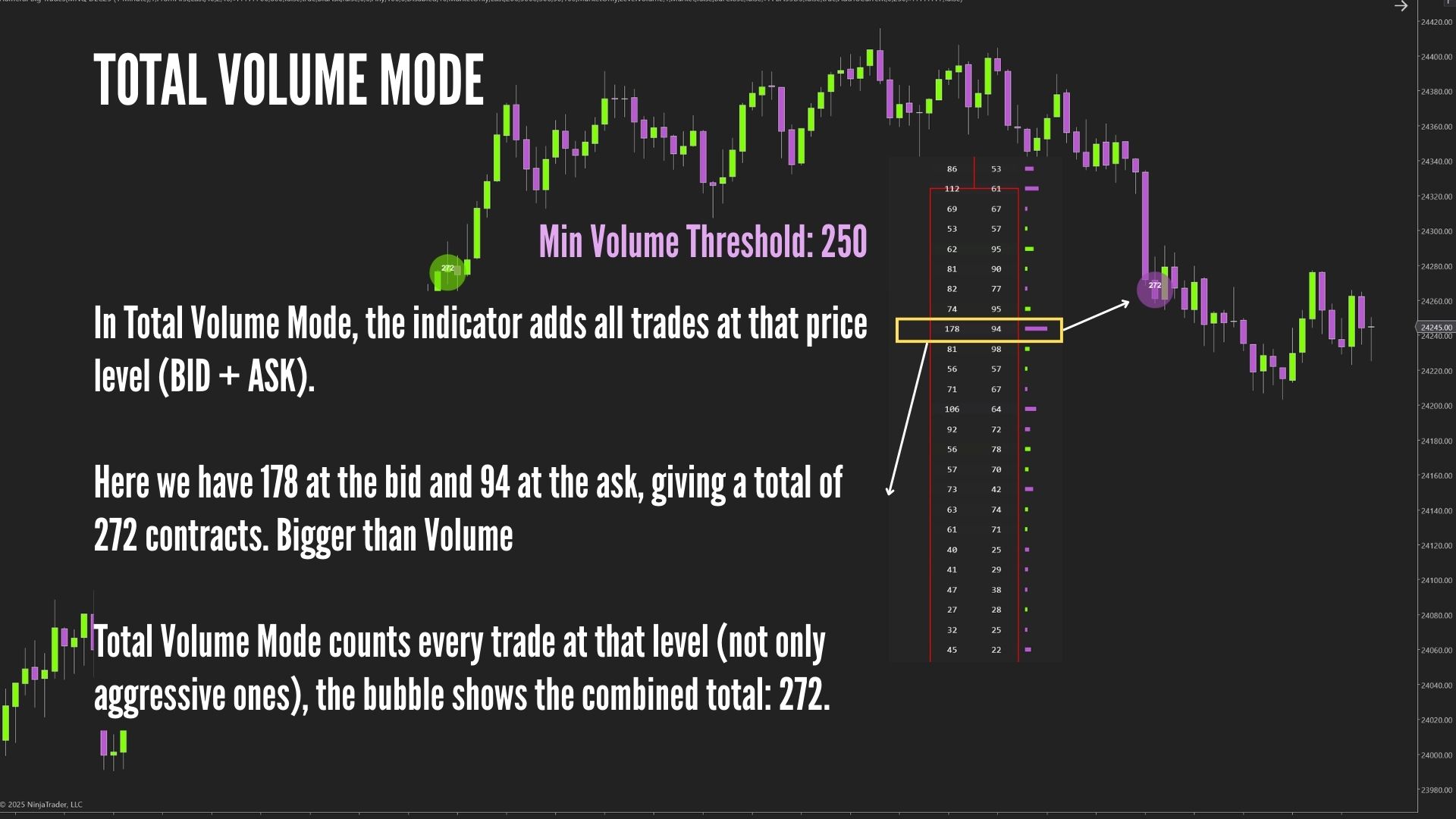
Level Volume Mode groups all trades (bid+ask) occurring at the same price level within the bar and creates a bubble when total volume at that price exceeds your threshold.
This reveals price levels where significant trading interest, absorption, or accumulation occurred, even if there was no fast sweep or bid/ask aggression.
Why Use It / Benefits
- Exposes high-volume nodes: shows where large traders are actively transacting at a specific price level.
- Reveals hidden accumulation or distribution: multiple large prints at a single price often mark key decision zones.
- Great for pullback traders: high-volume levels often become future support/resistance.
- Perfect for slower markets: works even when there is no sweep or rapid aggression, but volume is still meaningful.
Short Example
Price is ranging quietly. At one price level, a cluster of larger buy and sell orders appears over several seconds, creating a large bubble through Level Volume Mode.
This shows that major traders are engaging heavily at that price, forming a key decision zone.
If price revisits this level later, it may act as support or resistance depending on which side takes control.
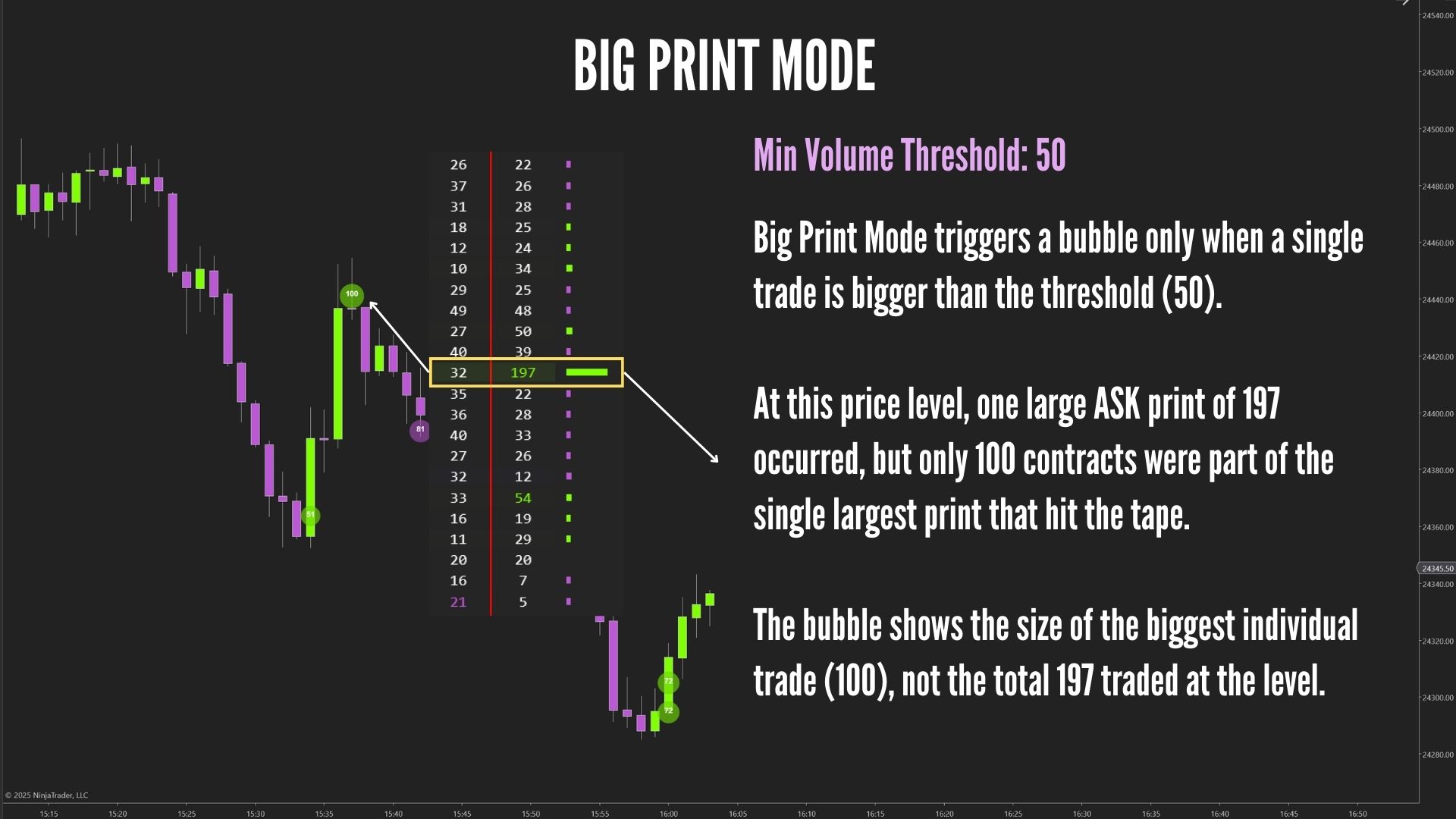
Big Print Mode – To Detect Single Large Market Orders Immediately
Big Print Mode triggers a bubble the moment a single trade exceeds your chosen size threshold.
There is no grouping, no time window, and no waiting – the indicator reacts instantly to unusually large orders hitting the tape.
This makes it ideal for spotting sudden institutional entries or exits the moment they occur.
Why Use It / Benefits
- Instant signal: bubbles appear the moment a large order prints, with zero delay.
- Spot institutional footprints: large single prints often belong to algorithmic execution or block-style trading.
- Great for reversals: big prints near extreme highs or lows often mark exhaustion or aggressive traps.
- Perfect for scalpers: shows exactly when size hits the market without needing multiple trades.
Short Example
Price pulls back into support. Suddenly, a single large buy market order exceeds your threshold and a green bubble appears instantly using Big Print Mode.
This shows that a strong buyer stepped in at that exact moment.
If the next candles confirm, this single big print can signal a high-probability reversal or a strong continuation off the level.
Smart Aggressor Logic – Works with Bid/Ask or Just Price
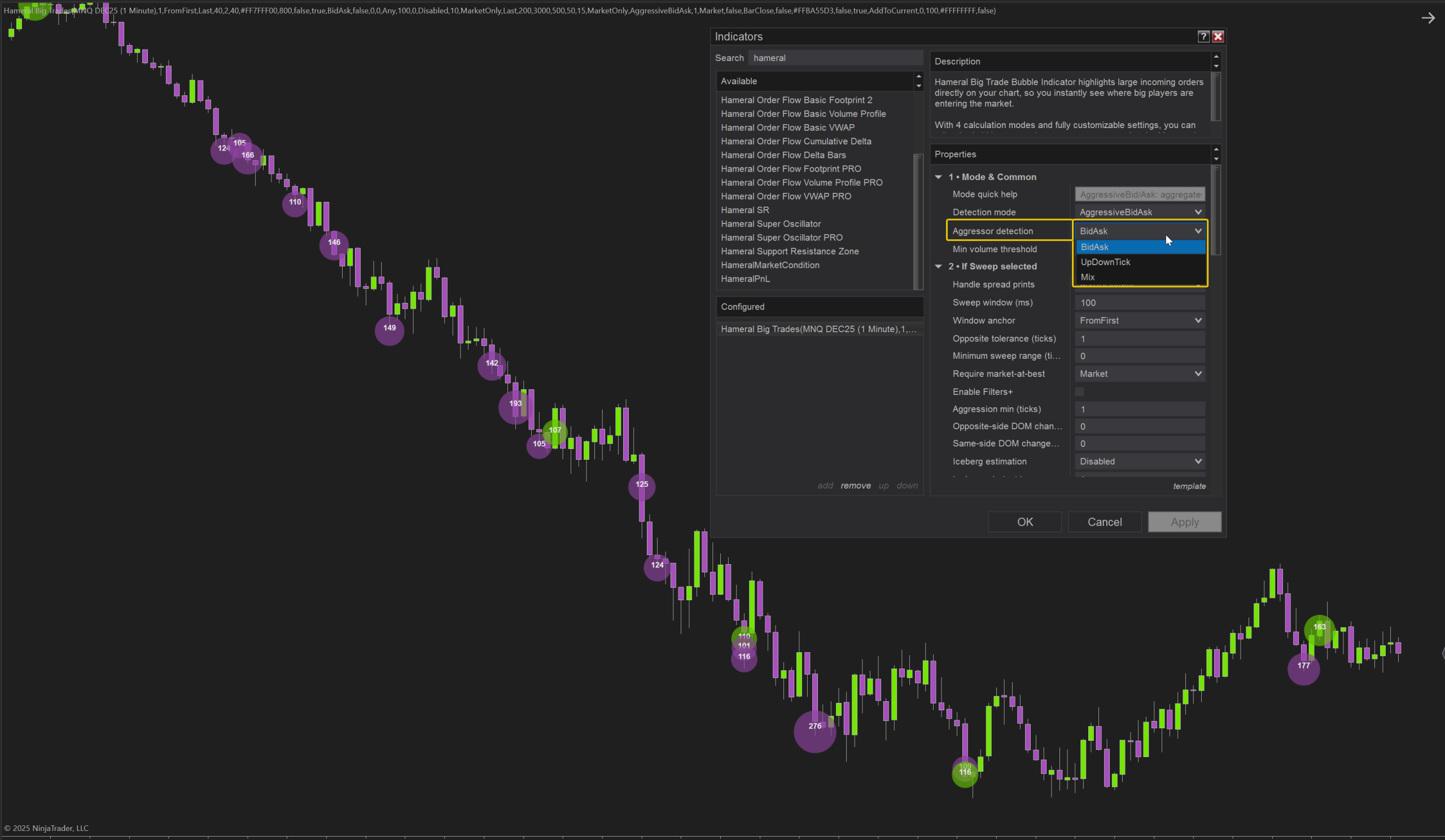
The indicator uses a flexible aggressor detection engine to decide whether trades are buying or selling:
- Bid/Ask mode (OrderFlowCalcMode.BidAsk): classifies trades based on where they hit relative to the best bid and ask — the most accurate method when your quote data is solid.
- Up/Down Tick mode: infers trade direction from price changes when bid/ask quotes are incomplete or missing.
- Mix mode: automatically uses Bid/Ask when available and falls back to Up/Down Tick when needed.
This ensures your bubbles always reflect real order flow direction – even when your data feed has gaps – giving you a reliable read on whether buyers or sellers were truly in control.
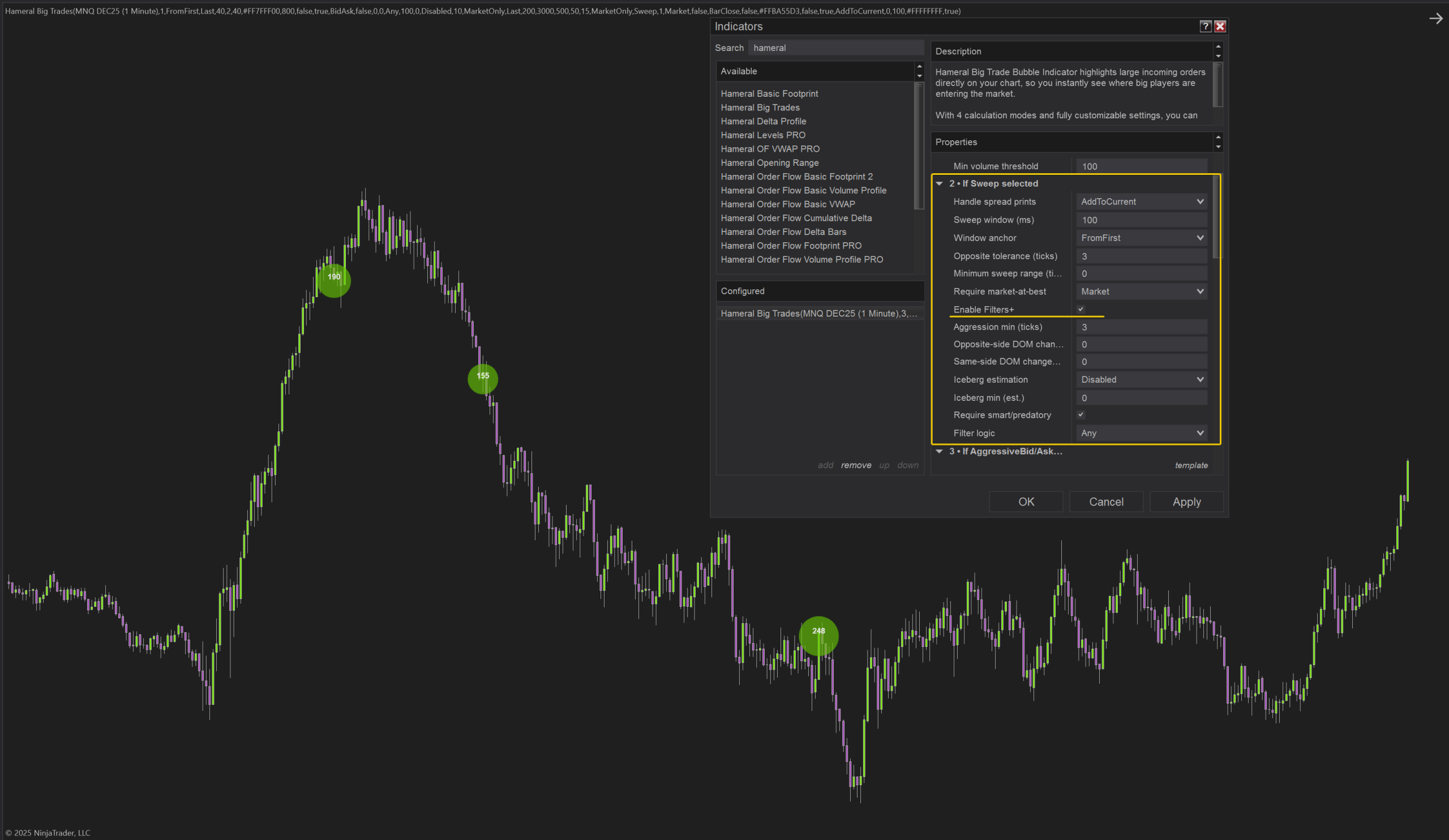
Filters+ – To Isolate Only the Highest-Quality Smart Money Events
Filters+ lets you refine Sweep Mode so that bubbles are created only for the most meaningful, high-quality order flow events:
- Aggression in ticks: require price to move a minimum number of ticks in the sweep direction, so only flows that actually push the market will print a bubble.
- DOM pressure filter: check how much opposite-side depth is depleted during the sweep, highlighting events where liquidity is truly being eaten.
- DOM support filter: measure how much same-side depth increases (reloads), revealing strong backing or iceberg-style behavior behind the move.
- Iceberg estimation: estimate iceberg volume through refills and DOM changes, with a minimum iceberg size filter to catch only serious hidden orders.
- Smart / predatory condition: optionally require that opposite-side liquidity was fully depleted at least once, marking highly aggressive, “smart” events.
- Any vs All logic: choose whether one selected condition is enough to trigger a bubble, or if all chosen conditions must be satisfied.
With Filters+, you are not just seeing big trades – you are isolating truly impactful smart money activity, cutting through noise and focusing only on the events that can move or reverse the market.
Labels & Detailed Stats – Extra Context When You Need It
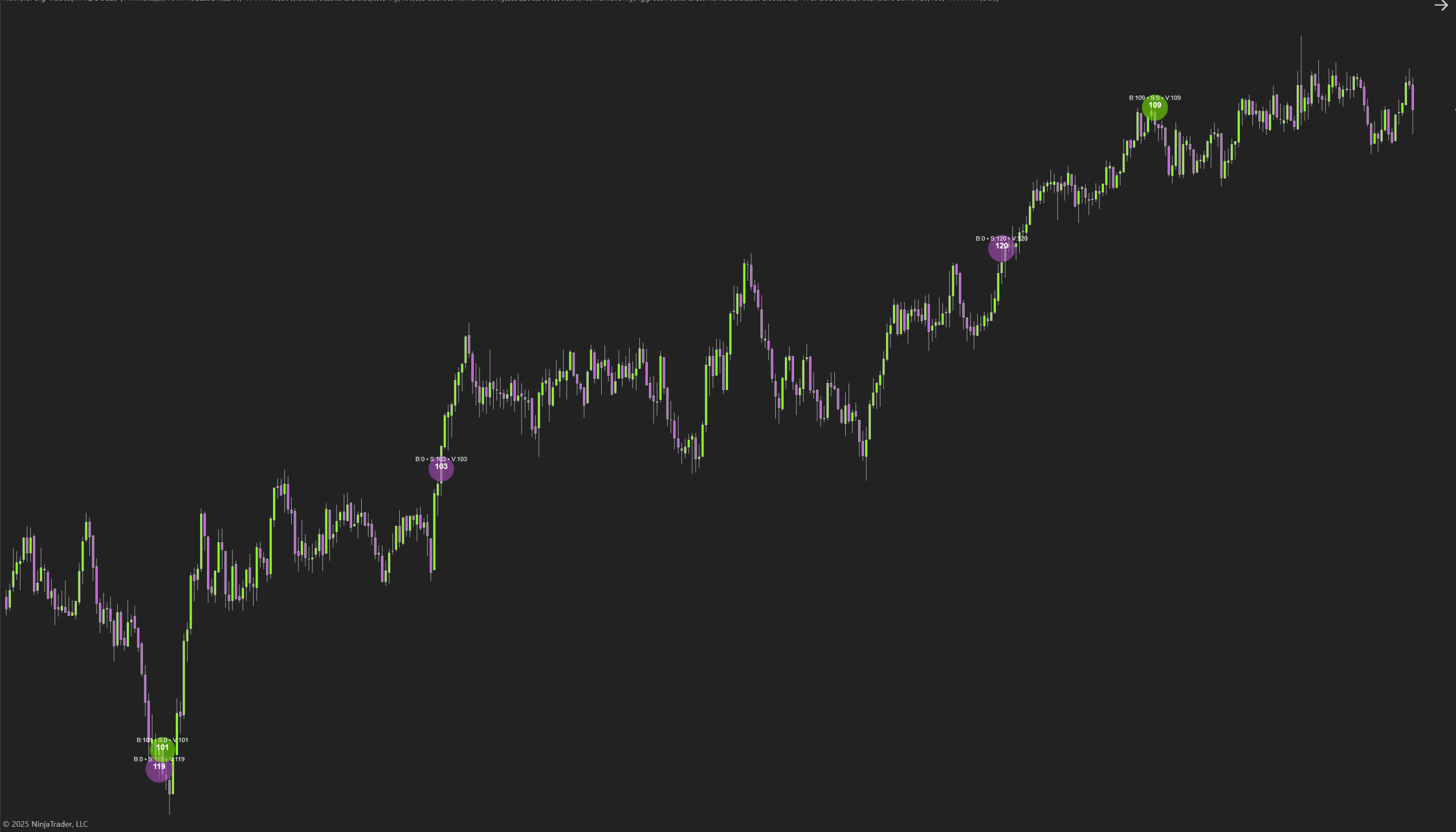
You can keep the bubbles clean for live trading or enable detailed information when analyzing markets more deeply:
- Volume labels: show total or aggressive volume directly inside the bubble for instant clarity.
- Detail text below bubbles: optionally display sweep aggression (ticks), DOM pressure, DOM support, iceberg estimate, and “Smart” flags for high-quality order flow events.
- Debug mode: advanced overlay that reveals internal processing information — ideal for fine-tuning settings and validating behavior during replay.
These tools allow you to switch effortlessly between a clean visual layout and a highly detailed analytical view, depending on what the moment requires.
Dynamic Bubble Sizing, Colors & Opacity – Read Size Instantly
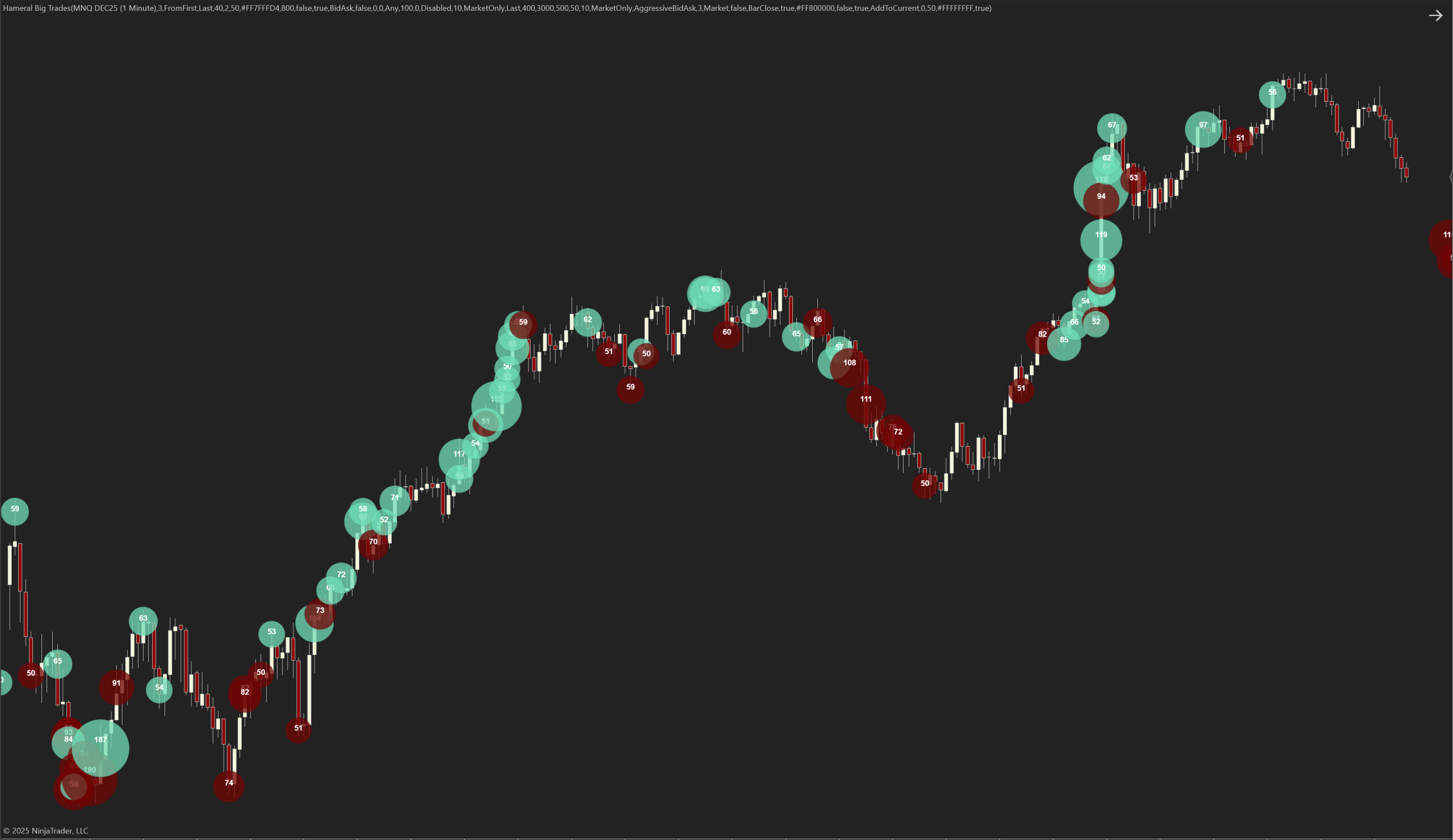
Each bubble’s visual impact scales automatically with volume:
- Min/Max bubble size and Min/Max volume for scaling let you define what “small” and “huge” look like on your chart.
- Total vs. Market volume: choose whether scaling and filtering use total traded volume or only aggressive (market) volume — depending on whether you want to visualize all size or only true aggressor activity.
- Full visual control: adjust bubble opacity, border width, border darkness, and separate buy/sell bubble colors for instant directional recognition.
This makes it effortless to see, at a glance, where the biggest battles took place, which side dominated, and which bubbles are important enough to deserve your attention during fast markets.
Use ChatGPT for custom configuration
ChatGPT is trained to give you configuration suggestions and to answer to questions related to the Hameral Big Trade Orders Bubble Indicator.
Copy–Paste Prompt to Get Your Custom Indicator Configuration
Copy and paste the prompt below into ChatGPT to receive a fully customized configuration for your asset:
I want you to help me configure the **Hameral Big Trade Orders Bubble** indicator for my specific asset.
Here is everything you need:

1. **My trading details:**
   - Asset: (example: NQ, ES, CL, GC, 6E, BTC, etc.)
   - Timeframe: (example: 1-minute, 233 ticks, 5-minute, 2-range, etc.)
   - Trading style: (scalping, intraday, swing, breakout, reversal, order flow scalping, etc.)
   - Volatility conditions: (normal, high, low, session-specific, etc.)

2. **Indicator information:**
   I am using the **Hameral Big Trade Orders Bubble** indicator.
   Here is the description explaining what each mode and filter does:
   [paste the description from the website here]

3. **My goal:**
   I want the **best initial configuration** for this asset, including:
   - Best Detection Mode + explanation
   - Recommended volume thresholds
   - Sweep time window settings
   - Whether to use aggressive-only or total volume
   - Filters+ settings (DOM pressure, DOM support, iceberg, smart condition)
   - Whether to use Bid/Ask or Mix aggressor logic
   - Recommended bubble scaling settings
   - A “clean” version and an “aggressive” version
   - A tuning guide (what to adjust if too many or too few bubbles)

4. **Screenshots (optional but helpful):**
   I will upload screenshots of my indicator settings if needed.

**Your job:**
Based on all the above, create the optimal indicator configuration for my asset, explain each setting, and provide a tuning guide.
Examples
Hameral Big Trades Orders Bubble Examples